Introduction
I took the decision to come back to my passion for FOSS, IT and Security after a long year of bad events. Focusing on what I like, my friends and my family bringing back the joy of enjoying technology without being absorbed by it. That is why I decided to create this series unoriginally called "Diario di bordo" (Logbook for my English speaking readers) where I rant about my projects, discoveries and recent interests. The first step I took was to re-learn to enjoy a minimal OS with keyboard based navigation, few distractions and nice CLI tools.
At the same time I wanted to use more container based technologies, and sandboxed applications. This requirements led my to Fedora Sway Atomic.
Installation and first steps
The installation experience is very similar to the standard Fedora installation: straightforward, with a good amount of customizations and the possibility of enabling full disk encryption. What comes after the installation is the real deal.
Fedora Atomic is an immutable system, the root partition in Read Only and thanks to the btrfs filesystem all the upgrades and packages installation are transactional: this means that either they're fully applied or the system is rolleback from the previous version. The bootloader let's you choose between your pinned base or the previous one ensuring that your system always works.
Such implementation comes with some usability downsides: installing software on the base system (layering) is expensive and not suggested, common programs are provided via Flatpak, and CLI tools can be installed in Toolbx containers - allowing to always have a clean base system, and use different distribution for our purposes.
Leveraging this two aspects, I've decided to install VSCodium Flatpak and create one Arch based toolbox. While I have little intention to use VSCodium daily, I wanted to learn more about devcontainers and how to set-up a real reproducible development environment. My daily editor (almost IDE) is Neovim; which I configured following a fantastic video series from The Rad Lectures. In addition to all of this I had my good share of fun ricing Sway.
Ricing sway
Default configuration overwrite
Since the root filesystem is read only is not possible to change config files stored, for example, in /etc; to override standard configurations it is necessary to copy files in the XDG_CONFIG_HOME and change them; this will override the default configurations and help us in managing all the aspects of the operating system.
To manage all my dotfiles I use GNU Stow and Git, this set-up is not ad-hoc for this particular installation, but I am using it since a while to have the same ZSH, Starship and Tmux configuration across multiple systems that I daily use.
Theme
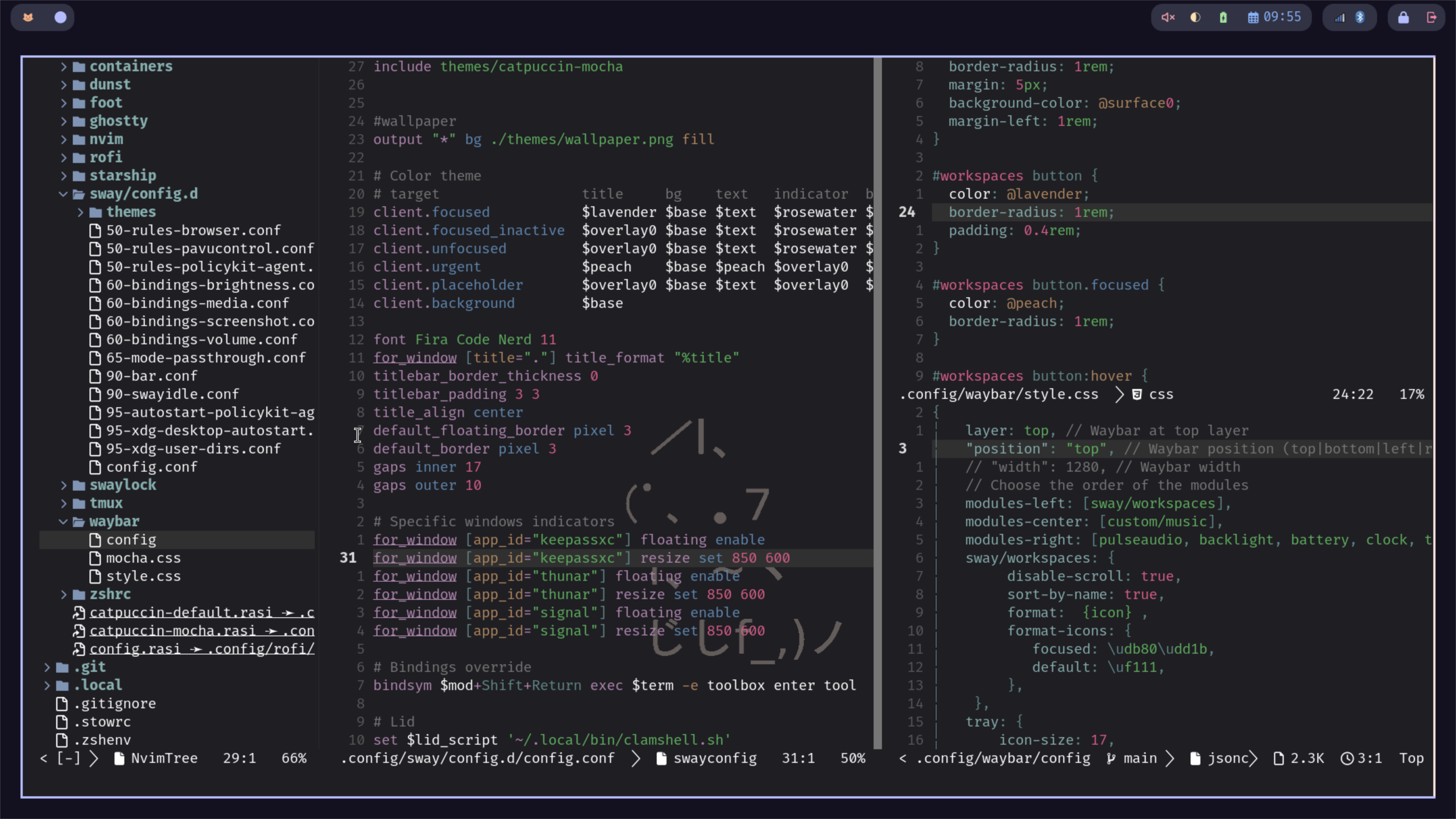
The theme I've choose to follow is a minimal, catpuccin mocha coloured, cat inspired ambiance (whatever that means). The main goal is to have a color palette that is easy to the eyes for long sessions of coding, writing, research, while being nice to look at.
I personally don't like excess animations, nor prominent effects like backdrop shadows so a minimal configuration with a good contrast-ratio to defferentiate screen elements is good enough for me.
Foot
The terminal emulator of choice is Foot just because it is shipped with Fedora Atomic Sway, and fits quite well my needs. It is customizable, fast, and lightweight. My font of choice is Fira Code Nerd, which allows me to use Nerd glyphs, ligatures across CLI tools, while being well readable and well spaced.
Rofi launcher
I am pretty sure that I am not using Rofi at the most of its capabilities, for me it is a simple launcher that I use to open all the non CLI software that I have installed.
Dunst
Dunst is a very simple notification deamon that comes pre-installed in Fedora Atomic Sway. I've styled it to follow the Catpuccin mocha theme and nothing more.
Waybar
Luckily also waybar comes preconfigured with the installation of the OS, leaving to me only the fun to styling it accordingly to the rest of the visual elements with Catpuccin Mocha color scheme inspired by this conf I did some nice changes and addition to the Icons and the colors.
ZSH
While I don't mind using Bash as default shell, I enjoy using ZSH, so I decided to install it in the main toolbox that I use but not to layer it over the base system. I do not use any particular ZSH plugin, but I have my set of trusted aliases that I am used to since long time.
Starship
On top of ZSH I installed Starship prompt, as I like its configurability, and how it provides contextual information about the current working directory without cluttering the available space too much. I have the impression that I could improve its set-up a bit.
TMUX
My TMUX configuration is pretty simple, likely all the others, I've adopted catpuccin color scheme, and just one plugin: TMUX Sensible. It is a powerful tool by itself, and I don't feel additional plugins are necessary.
Neovim
In my opinion Neovim is one of the most powerful text-editors available, it is highly configurable, modular and thanks to the high number of available plugins its capabilities may increase drastically.
It is really possible to configure it in such a way to be the almost the only piece of software used daily, for writing, research and software development. I would not spend a lot of time on Neovim in this page because I am planning a dedicated post for it.
To be consistent with the overall theme, I am using a catpuccin inspired colorscheme with a low opacity backdrop that allows me to see the desktop wallpaper without sacrificing visibility. This very article is written and published inside Neovim.
Podman and its challenges
All editions of Fedora Atomic come with Podman as container manager, which, differently from Docker is rootles by default. This means that some precautions and changes are needed when running some specific containers.
Personally I am working with Laravel for a project, and I find Sail a good way to set-up an easy and reproducible working environment for a small team - allowing minimal dependencies and easy set-up of Devcontainers if needed. However using Sail with Podman is not straightforward as it may seem, and some changes should be done before starting.
- A docker-compose.override.yaml should be present at the same level of the
compose.yamlfile to ensure that the PHP container runs correctly - The
SAIL_DOCKER_BINARYenvironmental variable should be set topodman.
Additional changes in XDG_CONFIG_HOME/containers/containers.conf are necessary to ensure the correct execution of devcontainers launched with DevPod or inside VSCode.
[containers]
label = false
log_driver = journald
userns = keep-id
[engine]
compose_warning_logs = false
env = [
    "BUILDAH_FORMAT=docker"
]
runtime = "crun"
At this stage is possible to execute the Sail containers via ./vendor/bin/sail up command or, if .devcontainer/devcontainer.json is present by opening the folder is VSCodium and using the DevContainers extension.
While Podman may not be appropriate for all use cases it is perfectly usable on my system with some small tweaks.
DevPod and Devcontainers
One of the first tool I've tried is DevPod which allows you to easily start a workspace based on a Devcontainer on any IDE you like instead of being forced to use VSCode. I've installed DevPod in my ~/.local/bin directory and I've mostly used the CLI, but I should try the GUI applications as it allows to quick start many environments.
Since DevPod assumes the Docker is used as provider, some configuration changes are necessary to make it work. The default Docker provider assumes that the docker command is in your path; to change the default behavior the commands below are necessary:
# Print provider information
devpod provider options

# Change the provider default
devpod provider set-options docker --option DOCKER_PATH=podman
devpod provider set-options docker --option DOCKER_HOST=unix:///run/user/${UID}/podman/podman.sock
An additional step that I have to take to better implement DevContainers in my workflow is to install the necessary Neovim plugins for working with them. Ideally DevPod allows to start a DevContainer without IDE, and then thanks to Netrw it is possible to connect the Neovim to the running Devcontainer instance.
VSCodium (Flatpak)
Following the Fedora Atomic documentation I've decided to install GUI applications: KeepassXC, Thunderbird, Firefox, Signal Desktop and VSCodium as Flatpaks. I know that it is possible to install GUI applications in toolbox and open them via Rofi, but I wanted to keep the complexity as low as possible.
When using VSCodium as flatpak some additional configurations are needed to make it useful.
First and foremost the integrated terminal settings should be updated to make sure that the host terminal (or a toolbox terminal) are used.
terminal.integrated.profiles.linux": {
    "bash_host": {
      "path": "/app/bin/host-spawn",
      "args": [
        "bash"
      ],
      "icon": "terminal-bash",
      "overrideName": true
    },
}
This profile can be set-up as default for even better usability.
If the Devcontainers extension is used additional two lines are needed to ensure that Podman is used, similarly to DevPod:
"dev.containers.dockerPath": "/var/home/user/.local/bin/podman-host",
"dev.containers.dockerSocketPath": "unix:///run/user/1000/podman/podman.sock",
In summary
Using Fedora Atomic comes with a lot of advantages, ensuring an always working system, on the other hand, some additional configurations are needed together with a good knowledge of Podman and how containers works. The additional effort is particularly needed when setting-up development environments since the combination of Flatpak VSCodium and Toolbox (or Devcontainer) is basically a two layer sandbox. The main advante is however the ability to basically use every distro without distro-hopping.
Let me know what you think about this post on Mastodon
